

Purpose
Suppose Microsoft Outlook user John Doe has access to a personal mailbox and additional mailboxes (e.g., "info" <info@company.com>, "sales" <sales@company.com>) on the Exchange server. When John Doe creates a new message and selects a shared mailbox address as the From address, the draft is saved in the personal Drafts folder instead of the shared mailbox's Drafts folder.
The CoolDraft add-in ensures that a message composed using a shared mailbox's From address is saved to that mailbox's Drafts folder.
The add-in also records the original author of the message, which can then be displayed.
Current version: 1.0.3
The application is a COM add-in compatible only with classic desktop Outlook for Windows. It does not support the new Outlook for Windows.

How it works
CoolDraft scans the sender address of each saved message in the main mailbox’s "Drafts" folder. If it matches the name of an additional mailbox, the message is moved to the appropriate "Drafts" folder.
Installation
- Download and extract CoolDraft_DEMO.zip, then run CoolDraftSetup.exe and follow the instructions.
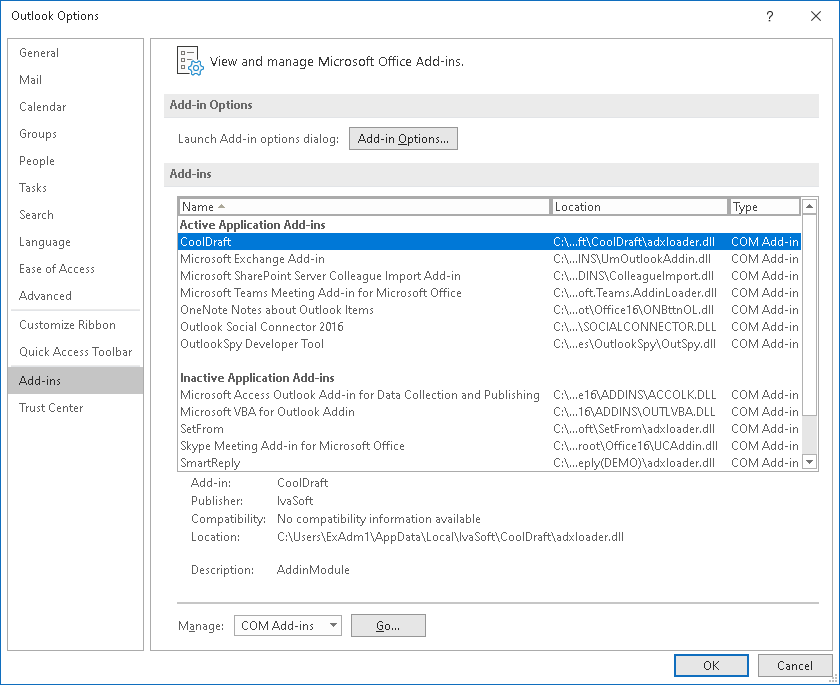
- Start Outlook. Select File > Options > Add-ins and verify that CoolDraft appears under Active Application Add-ins.
Testing
Suppose that the primary mailbox name is "John Doe" and the additional mailbox name is "testuser1".
- Open Outlook and click the "New" button to create a new message.
- Enable the "From" field and enter "testuser1".
- Save the message (Ctrl+S or File > Save).
- Navigate to testuser1 > Drafts. Confirm that the saved message appears there.
- Open the "View" menu. Select "View Settings", then click the "Columns…" button.
From the bottom-left dropdown, select "All Document Fields".
In the "Available columns" list, select "Author" and click Add. - Click OK to close the Columns dialog box, then click OK again to close the View Settings dialog box.
The Author column will show John Doe as the original author of the message.

CoolDraft has been tested with Outlook 2013, 2016, 2019, 2021, and 365 on Windows 10 and 11.
Uninstallation
You can uninstall the add-in via Settings > Apps ("Installed Apps" in Windows 11, "Apps & features" in Windows 10).
Demo Version Notes
The demo version appends the tag "[CoolDraft DEMO]" to the subject of each processed message; the full version does not.
FAQ
Q. Are updates free?
A. Registered users receive free updates for one year after purchase.
Pricing and Licensing
Payments are processed by PayPro Global and BMT Micro. PayPro Global Customer Support BMT Micro Customer Support


An Enterprise license covers all computers across a single organization worldwide, including all branches and remote users.
Affiliate Program
Earn a commission on every sale you refer through the PayPro Global affiliate network.
- Register as an IvaSoft affiliate in PayPro Global Affiliate System.
- Review the IvaSoft affiliate campaign details, including enrolled products and target markets.
- Wait for approval from IvaSoft to activate your affiliate agreement.
- Download the promotional materials and referral link from your affiliate agreement.
- Place a banner ad or contextual link on your website or blog.
- Receive monthly payouts as outlined in your affiliate agreement.