

Purpose
This add-in sets the email account for all outgoing email — and because the actual account is used, your email will not show the "on behalf of" message.
For example, if you use Outlook mail, but want your 'from address' to be your Gmail address, this add-in makes that possible.
Outlook always uses the outlook.com account when you reply. You can select a different sending account when you reply, but it is easy to forget to do this for every email.
The problem is more complex for users who have both an Exchange account and an IMAP/POP3 account, as the Exchange account tends to default to being the primary sender. You can set "Always use the default account when composing new messages" but this feature does not always work. This behavior is described in more detail here: Outlook.com, Outlook 2016 and the Reply Account.
SetAccount forces Outlook to use the predefined account for all outgoing messages, whether they are new, replies, or forwards, regardless of which account originally received them.
The application is a COM add-in compatible only with classic desktop Outlook for Windows. It does not support the new Outlook for Windows.

Current version: 1.0.12
Installation
- Exit Outlook if it is running. Then download the SetAccount-Demo.zip, extract all files to C:\Program Files\IvaSoft\SetAccount, run SetAccountSetup.exe, and follow the instructions.
- Open Outlook and click File > Options > Add-ins. Select "COM add-ins" in the Manage: list box (at the bottom of the dialog) and click the "Go" button. Verify that SetAccount appears in the list and is checked.
- In Outlook, click File > Options > Add-ins > Add-in Options. Select the SetAccount tab. Select the account to use as the default. Click Apply, then click OK.
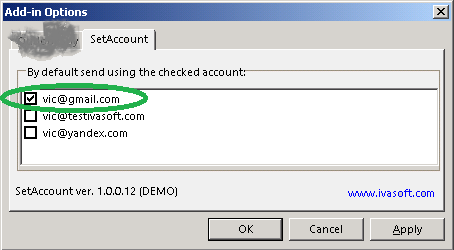
Testing
- Create a new message. Verify that the "From:" field is populated with the address of the account you set in the previous step.
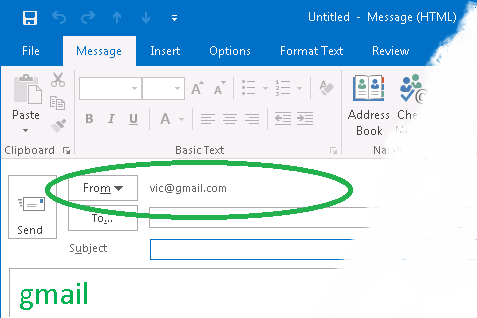
- Send this message. On the recipient's end, verify that the From address appears as expected.
SetAccount has been tested with Outlook 2016 and 2019 (both 32-bit and 64-bit) on Windows 10 and 11.
Demo Version Notes
The demo version appends the tag "[SetAccount DEMO]" to the subject line of each message processed; the full version does not.
FAQ
Q. Does SetAccount work only on messages that are replied to or forwarded, or will it also work with messages that I originate from scratch?
A. SetAccount sets the default sender account for each new (unsent and unsaved) message, regardless of whether it was composed from scratch, is a reply, or is a forward. Saved drafts are not affected.
Q. Are updates free?
A. Registered users receive free updates for one year after purchase.
Pricing and Licensing
Payments are processed by PayPro Global. For payment-related support, contact PayPro Global Customer Support.


An Enterprise license covers all computers across a single organization worldwide, including all branches and remote users.