


Updated:
5 August 2022
Purpose
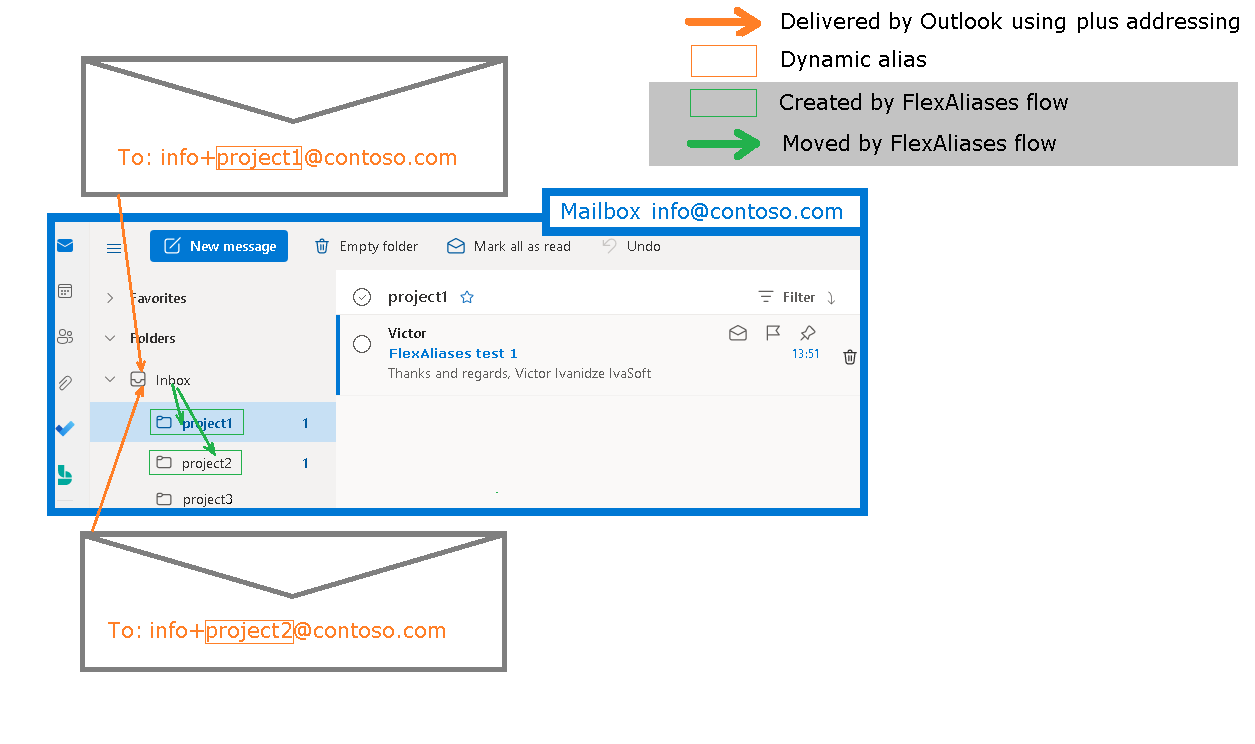
Plus addressing, also known as subaddressing, is a feature in Exchange Online that allows users to create unique, receive-only email addresses by adding a "+" followed by a tag to their existing email address. For details, see How to use Plus Addressing Effectively in Exchange Online?.
The FlexAliases flow moves the plus-addressed messages to subfolders under Inbox. The flow creates a dedicated subfolder for each plus address (subaddress).
Current version: 1.0.0.1
Installation
- Download the "FlexAliases.zip" file.
- Open Power Automate and import "FlexAliases.zip", following the Power Automate documentation.

- Turn on the flow.

Testing
- Send a test message to your plus address (e.g., yourname+test@company.com).
- Open Outlook and verify that the message has been moved to the corresponding subfolder under Inbox.
Freeware Notice
This product is freeware.
We do not provide technical support for it.
We do not provide technical support for it.
Support Pricing
If you require technical support, purchase at least one support unit and contact us. Support units are non-refundable.

One Support Unit Price: $35.00
